Let singers find their next song
Your published songbook is on their phone. They can browse what is available while you look after the current performance.

Hosted songbooks, venue QR codes and phone song requests for KaraPlayer.
Start with the free Windows player. Add Online when you are ready.
KaraPlayer Online
Let singers browse your songbook and send requests from their phones. Less paper. Fewer interruptions. You stay in control.
No automatic renewal on the one-month option.
Two registered PCs · Up to ten active venues
Already using the free KaraPlayer desktop app? This is the optional online service that works alongside it.
Made for the person running the show
Your published songbook is on their phone. They can browse what is available while you look after the current performance.
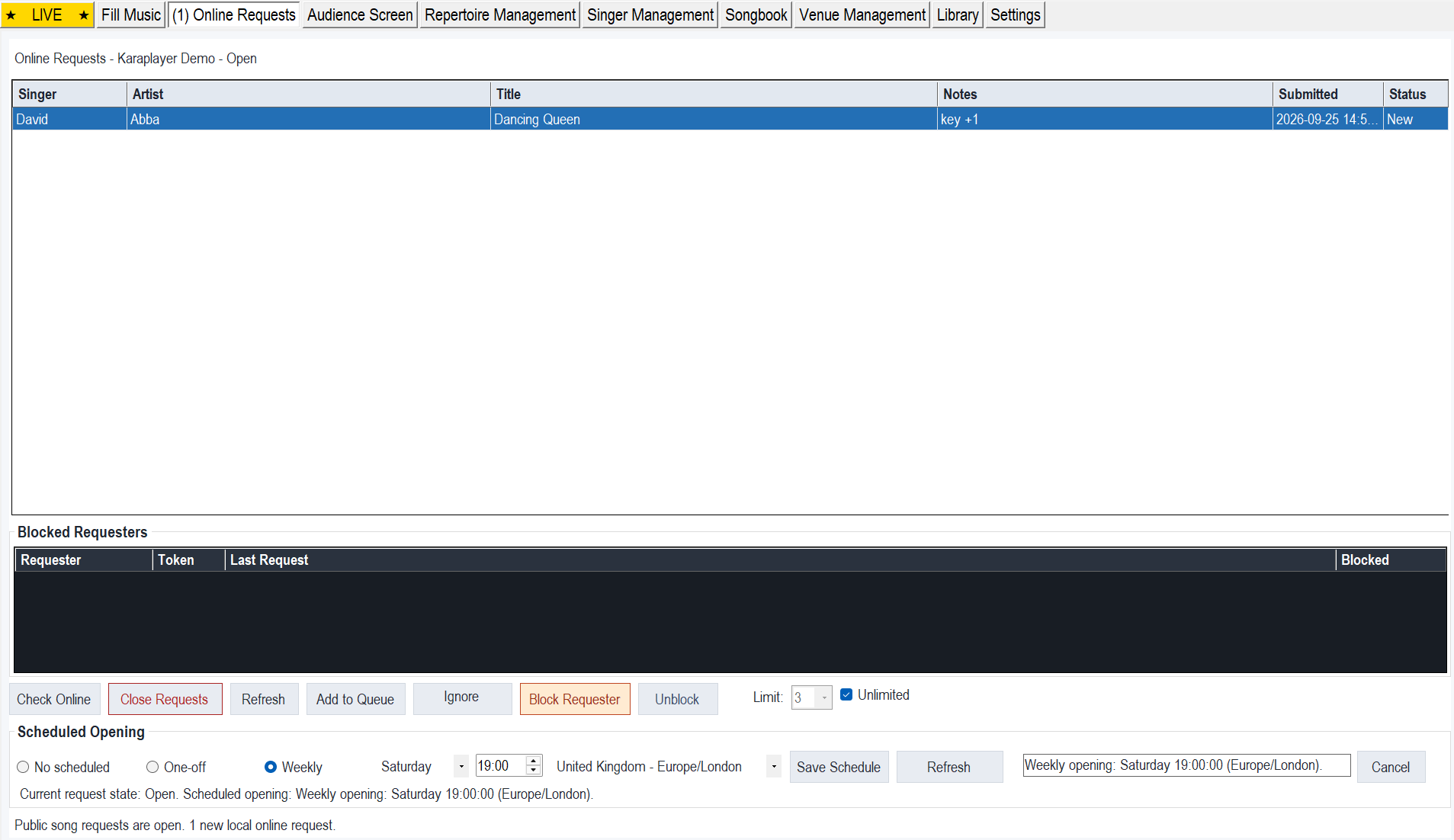
Song, singer and notes arrive in KaraPlayer for review, instead of relying on paper slips or a conversation over the music.
Open or close requests, set limits and decide what goes into the queue. Receiving a request does not add it automatically.
Assign a songbook to each venue and share its reusable link or printable QR code. Every access option covers up to ten active venues.
Try before you decide
Open the demo songbook on your phone or computer. Search for a favourite and choose a song to see the request form.
Demo only — requests will not be played. Use a made-up name and no personal details. If requests are closed, you can still explore the songbook.
The simple difference
Keep using the desktop controls you know. Add a convenient way for singers to find songs and send them to you.
See the presenter’s screen ↓KaraPlayer Online Solo
Same online features with every option. Choose how you want to pay.
A simple way to start
£10
One payment · One calendar month
No automatic renewal. Buy more time only when you want it.
Start with one monthFor regular shows
£10 / month
Renews monthly until cancelled
Keep access running. Manage or cancel renewal through Stripe.
Choose monthly accessA year of online access
£100
One payment · One year
No automatic renewal. £20 less than twelve £10 monthly payments.
Choose yearly accessIncluded with every option: hosted songbooks, venue QR codes and phone requests · Two registered PCs · Up to ten active venues.
You’ll confirm your access option on the ordering page before continuing to secure Stripe Checkout. An internet connection is needed for online features. Karaoke and music files are not included.
Your screen, your decisions
See the singer, song and notes together. Review each request, then add it to the queue. Open and close requests or schedule when they start.
Getting started
Pay securely through Stripe using your email address.
Enter the one-use code emailed to you. A second PC uses its own activation code.
Set up your venue, publish its songbook and print or share the venue QR code.
Let singers send their choices. Review them in the app and run your show as usual.
Need a hand? Email KaraPlayer support or use the guides below.
New to KaraPlayer?
Play your own karaoke files, organise singers and keep fill music ready between performances. Desktop playback and offline show management do not need a subscription or internet connection.
Online is optional. Let the free player earn its place in your show first.
For 64-bit Windows 10 and Windows 11. Use your own karaoke and music files.
Verify installer checksumGet started quickly, or explore the controls in detail.
Quick Start Guide PDF ↗Full User Guide PDF ↗The download button always points to the latest installer.
A few useful answers
No. One-month and one-year access are one-off payments with no automatic renewal. The monthly subscription renews until cancelled. The desktop player is free either way.
Your desktop playback, local library and offline show functions remain available. Only the online service requires active access.
No. You review incoming requests and choose which to add. You remain in control of the running order.
Yes. Each option covers up to ten active venues and two registered PCs. Venues can be open independently; KaraPlayer retrieves requests for the venue selected in the app.
Yes, for online songbooks and sending or retrieving requests. The free desktop playback and offline show functions can be used without internet access.
Stripe provides secure checkout and monthly-subscription management. KaraPlayer does not store your card details.
Ready when you are
One month of KaraPlayer Online for £10. No automatic renewal.